Skip to content
English
  • There are no suggestions because the search field is empty.

How do I create a  harvest report?

This guide explains how to create a slaughter report step by step and how you  easily can   export data as a PDF for documentation and further use.

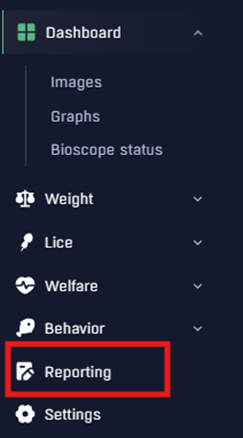
  1. Go to the pen for which you would like to create a slaughter report.
  2. Click Reporting in the side menu.
  3. Click New Report.
  4. Enter the required information: last feeding date, harvest date, and water temperature. Make sure all information is correct.
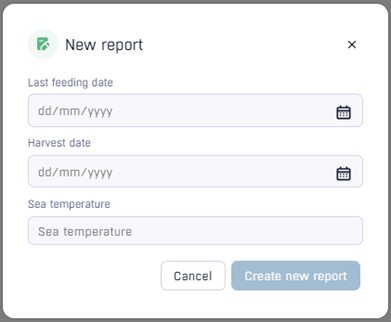
  5. Click Create New Report in the same window. The report will then be generated.
  6. Locate the report in the list and click Show under the Actions column to open it.
  7. Inside the report, you can change the unit from kilograms (kg) to pounds (lbs) using the option in the top right corner. You can also click Export in the top right corner to generate a PDF version of the report.


Can't find the answer you're looking for? Don't hesitate to reach out – we're here to help!

Norway

Email: support@optoscale.no
Phone: +47 930 73 377

Opening hours:

Monday–Friday: 9:00 AM – 6:00 PM
Saturday–Sunday: 10:00 AM – 2:00 PM

Iceland / UK / Faroe Islands

Email: support@optoscale.no
Phone: +47 930 73 377

Opening hours:

Monday–Friday: 8:00 AM – 5:00 PM
Saturday–Sunday: 9:00 AM – 1:00 PM

Canada

Email: support.canada@optoscale.no

Phone: +1 250 201 9995

Opening hours:

Monday–Friday: 9:00 AM – 3:00 PM

Chile

Email: support.chile@optoscale.no
Phone: +56 933 584 504

Opening hours:

Monday–Friday: 9:00 AM – 3:00 PM