Step by step - restart of the bioscope
-
Turn off the cabinet
-
Flip the red switch on the cabinet. Wait at least 1 minute before proceeding.
-
-
Check cables and connectors
-
Inspect both the cabinet and sea cable for dirt, water, corrosion, or loose pins.
-
Use contact spray if there is rust or corrosion.
-
Check the entire cable for cracks, kinks, or other damage.
-
-
Turn the cabinet back on
-
Flip the red switch to the “on” position.
-
-
Check the router lights
-
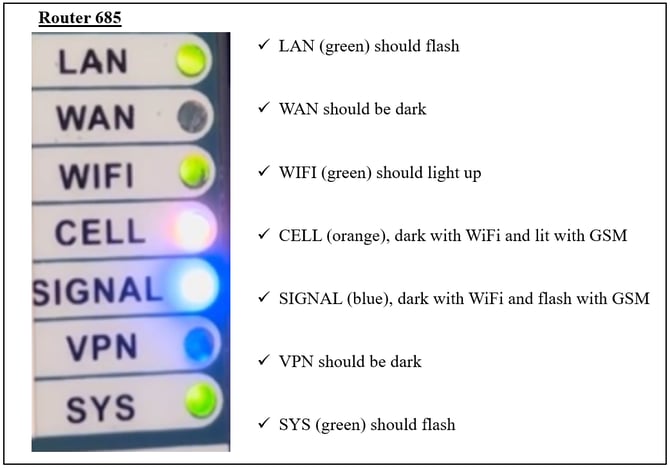
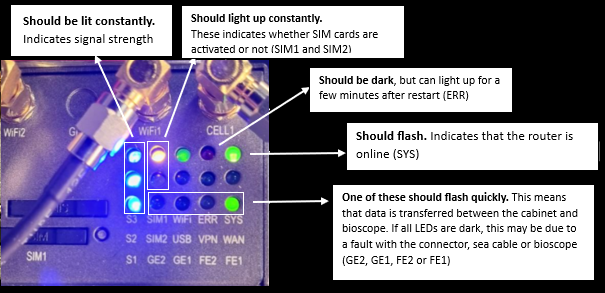
Compare with the reference images to see how the lights should appear (use the correct reference image depending on wether you are using bioscope 1.0 or bioscope 2.0)
-
If the lights differ, this may indicate a power, network, or bioscope issue.
- Note: After a restart, the lights one the routre will need some minutes before they light up normally.
-
- Contact support
- Feel free to contact support to check if the bioscope is online.
- We can guide you further.
Reference images
Router 900 - Bioscope 2.0
Router 685 - Bioscope 1.0